View OpenTelemetry data
This guide walks you through enabling OpenTelemetry auto-instrumentation for services running in an Olares cluster and viewing trace data in Jaeger.
Prerequisites
- Your target service runs as a Kubernetes workload (Deployment, StatefulSet, or DaemonSet).
- You have access to run
kubectlagainst the Olares cluster. - You can generate some traffic to the target service. Trace data is generated only when traffic exists.
Install Jaeger
Jaeger is used to visualize trace data. Install Jaeger from Market.
- Open Market from Launchpad and search for "Jaeger".
- Click Get, then Install, and wait for the installation to complete.
Apply tracing configuration
Prepare the tracing backend configuration before enabling auto-instrumentation.
- Click
otc.yamlto download the configuration file. - Upload the file to your Olares host.
- In the directory containing the file, apply it:bash
kubectl apply -f otc.yaml
Configure service access
To enable OpenTelemetry auto-instrumentation, add specific annotations to the Pod template of your workload.
Auto-instrumentation is triggered entirely by annotations. No code changes are required.
Rules for service access configuration
- Add annotations under
.spec.template.metadata.annotations(Pod template, not top-level metadata). - Pods will be recreated (rollout) for injection to take effect.
Saving changes
After you finish editing with kubectl edit, save and exit the editor. Kubernetes will roll out updated Pods automatically in most cases.
BFL service (StatefulSet)
- Edit the StatefulSet:bash
kubectl edit sts -n user-space-<olaresid> bfl - Under
.spec.template.metadata.annotations, add:yamlspec: template: metadata: labels: tier: bfl # Locate here and add annotations annotations: instrumentation.opentelemetry.io/inject-go: "olares-instrumentation" instrumentation.opentelemetry.io/go-container-names: "api" instrumentation.opentelemetry.io/otel-go-auto-target-exe: "/bfl-api" instrumentation.opentelemetry.io/inject-nginx: "olares-instrumentation" instrumentation.opentelemetry.io/inject-nginx-container-names: "ingress"
ChartRepo (Deployment)
Edit the Deployment:
bashkubectl edit deploy -n os-framework chartrepo-deploymentUnder
.spec.template.metadata.annotations, add:yamlspec: template: metadata: labels: app: chartrepo io.bytetrade.app: "true" # Locate here and add annotations annotations: instrumentation.opentelemetry.io/inject-go: "olares-instrumentation" instrumentation.opentelemetry.io/go-container-names: "chartrepo" instrumentation.opentelemetry.io/otel-go-auto-target-exe: "/root/app"
Olares app (Deployment)
- Edit the Deployment:bash
kubectl edit deploy -n user-space-<olaresid> olares-app-deployment - Under
.spec.template.metadata.annotations, add:yamlspec: template: metadata: labels: app: olares-app io.bytetrade.app: "true" # Locate here and add annotations annotations: instrumentation.opentelemetry.io/inject-nodejs: "olares-instrumentation" instrumentation.opentelemetry.io/nodejs-container-names: "user-service" instrumentation.opentelemetry.io/inject-nginx: "olares-instrumentation" instrumentation.opentelemetry.io/inject-nginx-container-names: "olares-app"
Files (DaemonSet)
- Edit the DaemonSet:bash
kubectl edit ds -n os-framework files - Under
.spec.template.metadata.annotations, add:yamlspec: template: metadata: labels: app: files # Locate here and add annotations annotations: instrumentation.opentelemetry.io/inject-nginx: "olares-instrumentation" instrumentation.opentelemetry.io/inject-nginx-container-names: "nginx" instrumentation.opentelemetry.io/inject-go: "olares-instrumentation" instrumentation.opentelemetry.io/go-container-names: "gateway,files,uploader" instrumentation.opentelemetry.io/otel-go-auto-target-exe: "/filebrowser"
Market (Deployment)
- Edit the Deployment:bash
kubectl edit deploy -n os-framework market-deployment - Under
.spec.template.metadata.annotations, add:yamlspec: template: metadata: labels: app: appstore io.bytetrade.app: "true" # Locate here and add annotations annotations: instrumentation.opentelemetry.io/inject-go: "olares-instrumentation" instrumentation.opentelemetry.io/go-container-names: "appstore-backend" instrumentation.opentelemetry.io/otel-go-auto-target-exe: "/opt/app/market"
System server (Deployment)
- Edit the Deployment:bash
kubectl edit deploy -n user-system-<olaresid> system-server - Under
.spec.template.metadata.annotations, add:yamlspec: template: metadata: labels: app: systemserver # Locate here and add annotations annotations: instrumentation.opentelemetry.io/go-container-names: "system-server" instrumentation.opentelemetry.io/inject-go: "olares-instrumentation:" instrumentation.opentelemetry.io/otel-go-auto-target-exe: "/system-server"
View traces in Jaeger
Traces may appear with a delay
After rollout, traces may take 1–5 minutes to appear. Make sure the service receives traffic.
Generate traffic to the service.
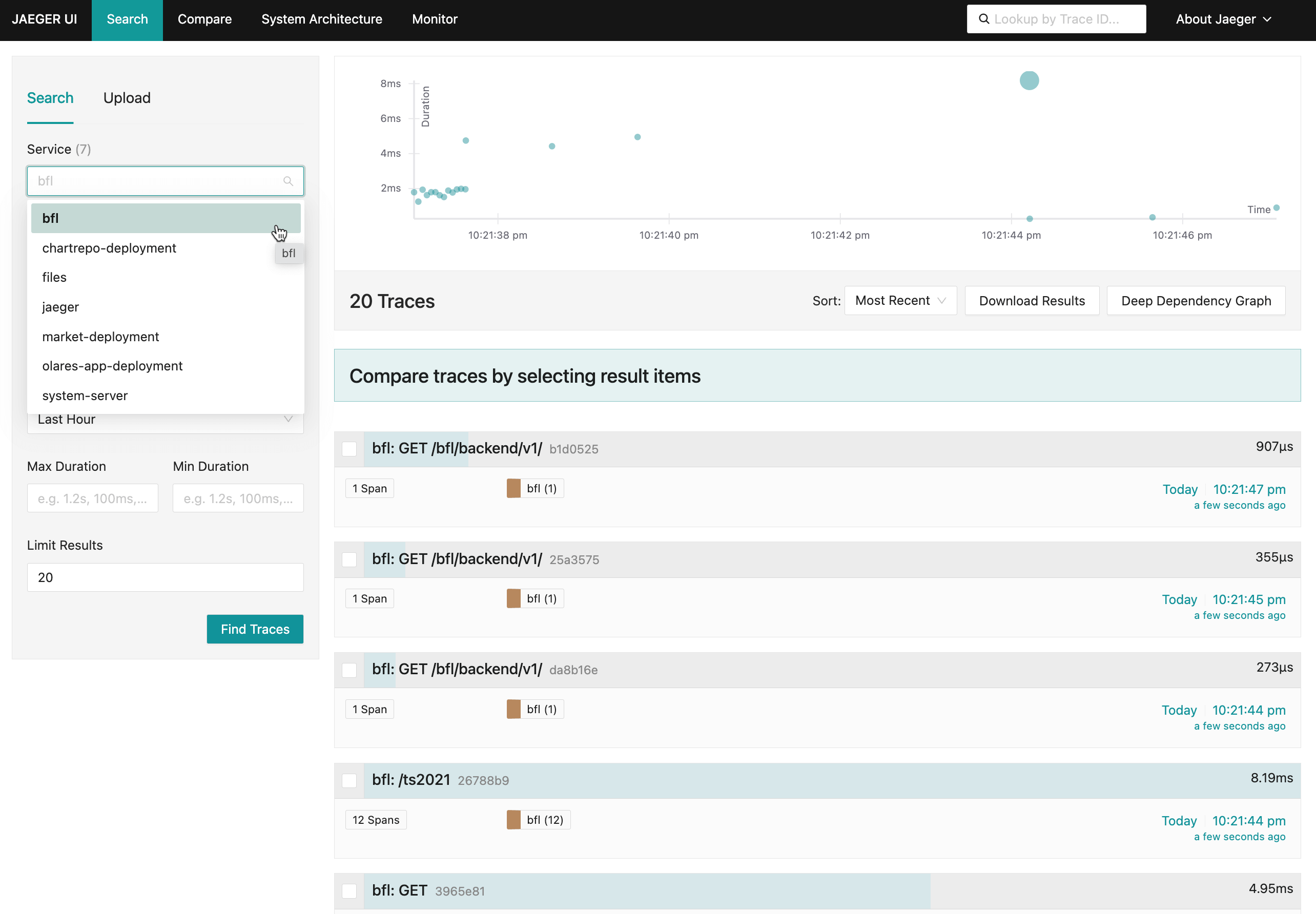
- Open Jaeger from Launchpad.
- Select the service name from the Service dropdown.
- Click Find Traces to view trace data.