Orchestrate multi-agent workflows with oh-my-openagent
oh-my-openagent (OMO) is a multi-model agent orchestration plugin for OpenCode. Once enabled, you can trigger multi-agent collaboration in OpenCode with the keyword ultrawork (or the alias ulw). Specialized agents such as Sisyphus, Hephaestus, Oracle, and Atlas divide the work and handle complex coding tasks together.
WARNING
This guide focuses on a local-model setup. Running OMO purely on local models noticeably degrades orchestration quality and multi-agent collaboration speed compared to paid cloud models. For real work, we recommend a hybrid setup: a paid cloud model for the main agent and Ollama local models for subagents.
Learning objectives
By the end of this tutorial, you will learn how to:
- Enable OMO in OpenCode on Olares.
- Configure OMO to work with local Ollama models, cloud models, or a hybrid of both.
- Trigger multi-agent collaboration with the
ultraworkkeyword. - Use the built-in context7, grep_app, and websearch MCP servers.
- Route documentation queries to a self-hosted Context7 alongside OMO.
Prerequisites
Your Olares device must have internet access.
OpenCode installed on Olares, chart version 1.0.6 or later.
Local models that support tool use, connected to OpenCode. This guide uses Qwen3.5 27B Q4_K_M and Qwen3.5 9B Q4_K_M as an example. In Olares, each of these models is a separate single-model app, so you need to add them as two model providers.
Model provider configuration
json{ "$schema": "https://opencode.ai/config.json", "disabled_providers": [], "provider": { "ollama-27b": { "name": "Olares Ollama Qwen3.5 27B", "npm": "@ai-sdk/openai-compatible", "models": { "qwen3.5:27b-q4_K_M": { "name": "Qwen3.5 27B" } }, "options": { "baseURL": "http://94a553e00.shared.olares.com/v1" } }, "ollama-9b": { "name": "Olares Ollama Qwen3.5 9B", "npm": "@ai-sdk/openai-compatible", "models": { "qwen3.5:9b": { "name": "Qwen3.5 9B" } }, "options": { "baseURL": "http://bd5355000.shared.olares.com/v1" } } } }Model capability requirements
- Local models with fewer than 7B parameters usually can't handle
tool_useor structured output correctly. Avoid them for any agent. - A context window of at least 32K tokens is recommended. Core agents (Sisyphus, Hephaestus, Prometheus, Atlas) work better with 64K or more.
- Local models, especially the Qwen family, sometimes fail to generate
writetool calls correctly. This is a known Ollama limitation.
- Local models with fewer than 7B parameters usually can't handle
Understand OMO on Olares
How models are selected
OMO splits model selection between you and the configuration file:
- Main model: The model for the agent you chat with directly. You pick it in the OpenCode UI's model selector. It is independent of
oh-my-openagent.json. - Subagent models: When the main agent calls
delegate_taskto hand work off to a subagent (such as Explore or Librarian), the subagent uses the model defined for that agent under theagentsfield in~/.config/opencode/oh-my-openagent.json.
The default oh-my-openagent.json ships with a multi-tier fallback chain for each subagent: a paid primary model, paid backup models, and free models provided by OpenCode as the last-resort fallback. If the first model is unavailable at runtime, runtime_fallback automatically walks down the chain to the next one. Roughly:
oh-my-openagent.json
└── agents
    └── <agent name>
        └── model chain:  paid primary → paid backup → free fallback
                              (runtime_fallback auto-switches on failure)
This keeps subagent delegation working even when a provider is down.
Default models in the configuration file
OMO tunes each agent's prompt for a specific model family. The default configuration file uses the following primary and fallback models:
| Agent | Recommended UI model (cloud) | Free fallback |
|---|---|---|
| Sisyphus | Claude Opus 4.6 | Big Pickle |
| Hephaestus | GPT-5.4 | Big Pickle |
| Prometheus | Claude Opus 4.6 | Big Pickle |
| Atlas | Claude Sonnet 4.6 | Big Pickle |
| Oracle | GPT-5.4 | Big Pickle |
| Explore | Claude Haiku 4.5 | GPT-5 Nano |
| Librarian | MiniMax M2.7 | GPT-5 Nano |
For the full list of recommended models per agent and per category, see the Agent-to-model matching reference.
Files that Olares manages for OMO
When you install OpenCode, Olares pre-configures OMO. The pre-installed items live under the global OpenCode configuration directory, which maps to Application/Data/opencode/.config/opencode/ in Olares Files. The rest of this guide uses ~/.config/opencode/ as shorthand for this path.
File inventory
| Path | What it does |
|---|---|
~/.config/opencode/opencode.json (the plugin field) | Registers "oh-my-openagent" in the global configuration. |
~/.config/opencode/oh-my-openagent.json | Recommended model per agent plus a runtime fallback chain. Written on first install only. |
~/.config/opencode/olares-baseline-instructions.md | Web preview, package management, and Olares domain conventions. Refreshed on every startup. |
~/.config/opencode/skills/web-preview/ and system-admin/ | Skill files. Force-updated on every startup. |
/usr/local/lib/node_modules/oh-my-opencode/ (inside the container) | npm package. Persisted in the system snapshot. |
All Olares-managed settings live in the global configuration directory. They are never written to your workspace opencode.json. If your workspace configuration still contains the old Olares-managed instructions, Olares removes them only when they exactly match the previous preset. Anything you added or modified yourself is preserved.
The oh-my-openagent.json file is only written on first install. If you later update it through the install command or by hand, your changes are not overwritten.
Configure OMO
Enable OMO
OMO is controlled by the OPENCODE_OMO environment variable:
false(default): the plugin is not loaded. The npm package and configuration files stay on disk, so enabling it later doesn't require another download.true: the plugin is registered in the global configuration and the npm package is installed.
To enable OMO:
Open Settings and navigate to Applications > OpenCode > Manage environment variables.
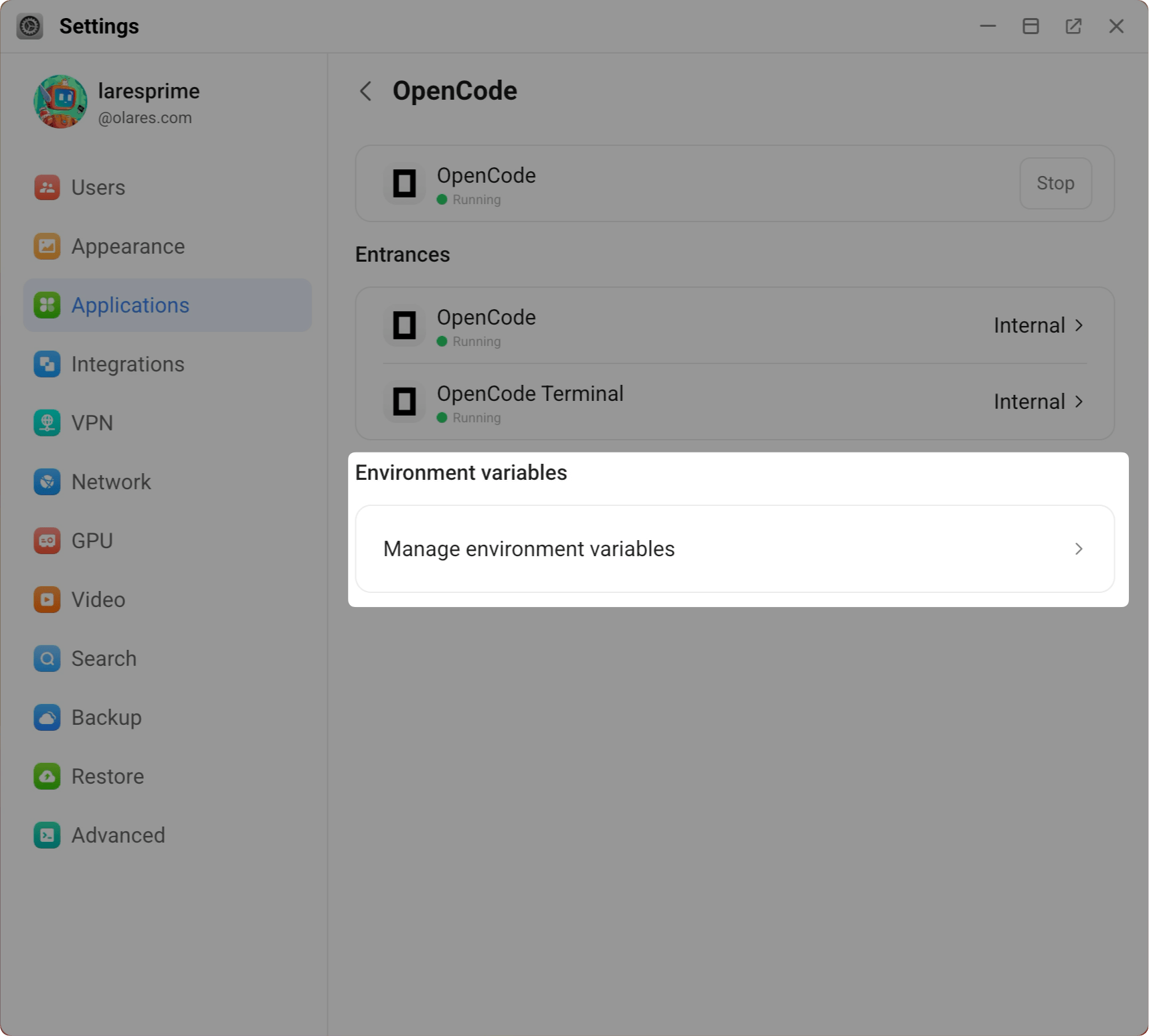
Find the
OPENCODE_OMOenvironment variable and click edit_square.In the Value drop down, select
true, and click Confirm.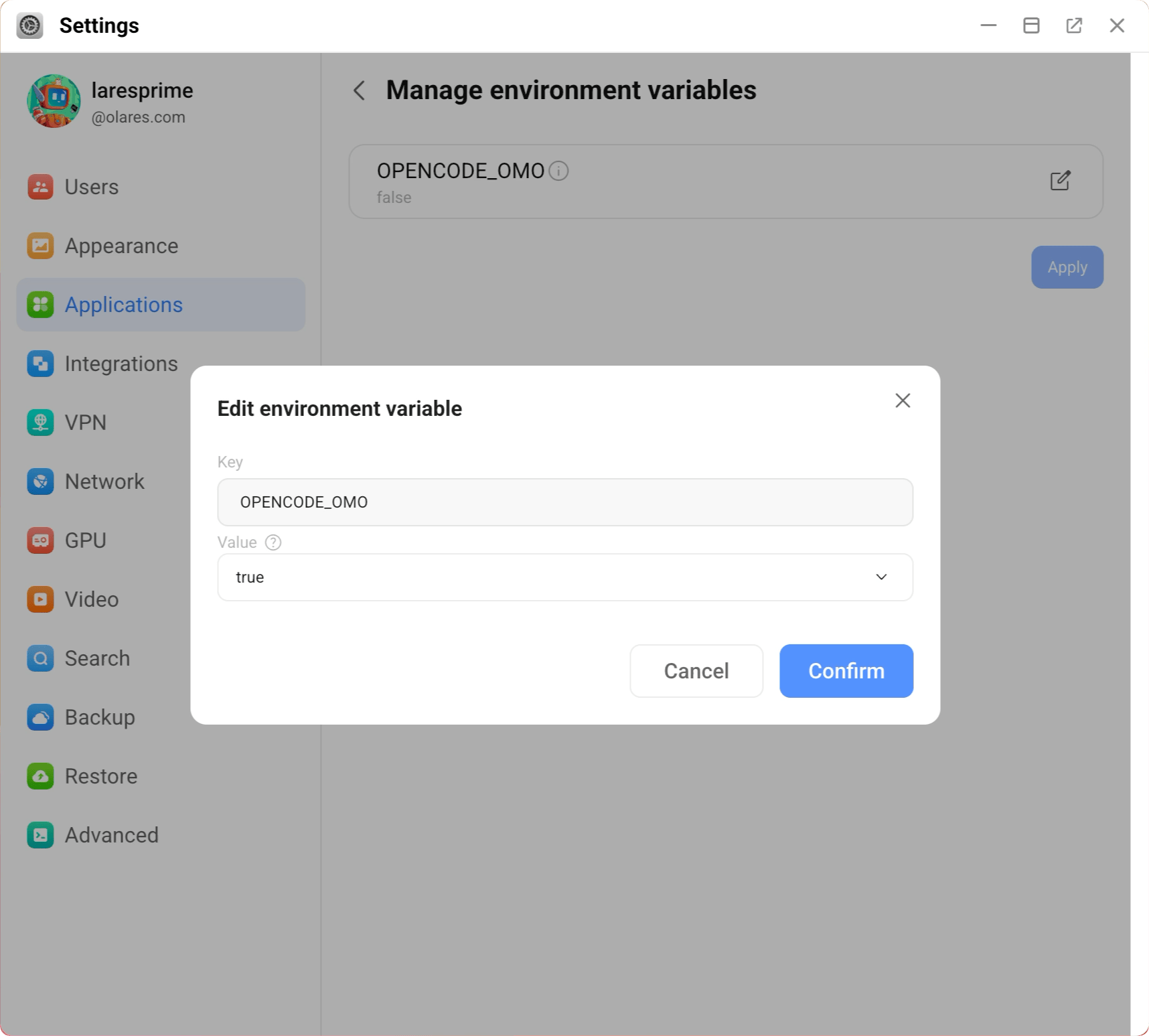
Click Apply to save your changes and wait for the app to restart.
On first launch, OMO needs time to finish its initial configuration. This may take a few minutes.
To disable OMO later, repeat the steps above and set OPENCODE_OMO to false. The plugin registration and MCP servers stop, but the npm package and the oh-my-openagent.json configuration stay on disk for the next time you turn it back on.
Configure local models
Edit ~/.config/opencode/oh-my-openagent.json so OMO delegates subagent work to your local Ollama models. You can skip this step in two cases:
- Cloud-only: You only plan to use cloud models. Add your API keys under OpenCode Providers and move on.
- Free fallback only: You don't want to pay or self-host models. OMO uses the free fallback models shipped with OpenCode, but expect slower responses and quota limits.
Restart required
Restart OpenCode after every edit to oh-my-openagent.json to apply the changes.
Open Olares Files, navigate to
Application/Data/opencode/.config/opencode/, and locateoh-my-openagent.json.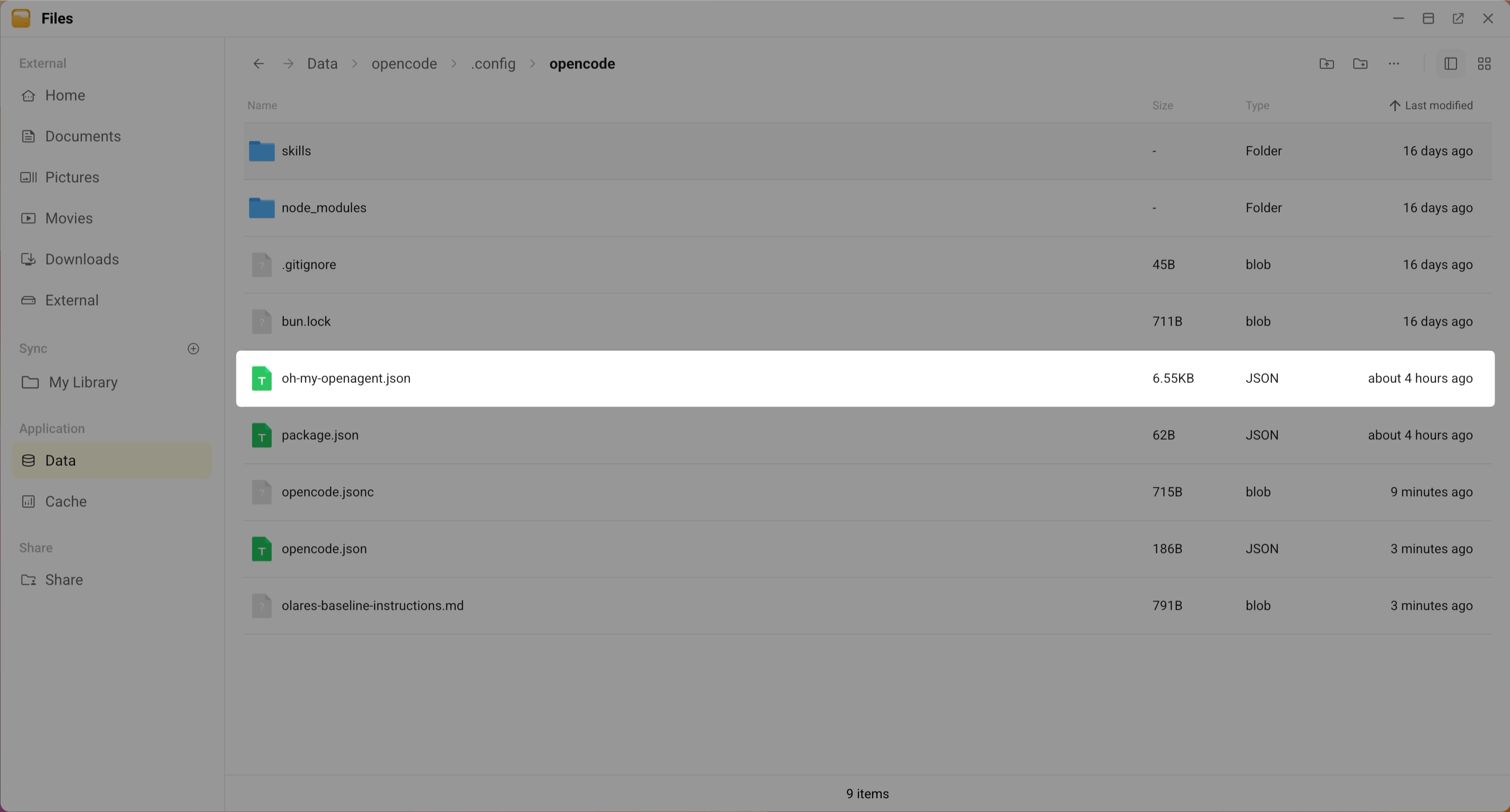
Open
oh-my-openagent.jsonand click edit_square to open the editor.Update the
agentssection so subagent delegation uses your local Ollama models:a. Point each agent's
modelfield to your Ollama model. The model name must include the provider prefix, which must match the provider names you defined inopencode.json.b. Add
"stream": falseto each agent.For example, if your providers are named
ollama-27bandollama-9b:json{ "agents": { "sisyphus": { "model": "ollama-27b/qwen3.5:27b-q4_K_M", "stream": false }, "hephaestus": { "model": "ollama-27b/qwen3.5:27b-q4_K_M", "stream": false }, "prometheus": { "model": "ollama-27b/qwen3.5:27b-q4_K_M", "stream": false }, "atlas": { "model": "ollama-27b/qwen3.5:27b-q4_K_M", "stream": false }, "explore": { "model": "ollama-9b/qwen3.5:9b", "stream": false }, "librarian": { "model": "ollama-9b/qwen3.5:9b", "stream": false } } }"stream": falserequirementOllama's streaming mode returns NDJSON, which the SDK can't parse. Agents that use tools (especially Librarian and Explore) silently fall back to the next model in the chain if
"stream": falseis missing. This is a known Ollama limitation.In the
categoriessection, update each category'smodelandfallback_modelslist so that local models come first. For example:
 "categories": {
   "visual-engineering": {
     "model": "ollama-27b/qwen3.5:27b-q4_K_M",
     "fallback_models": [
       { "model": "ollama-9b/qwen3.5:9b" }
       // ... keep the remaining default fallback entries unchanged
     ]
   },
   "ultrabrain": {
     "model": "ollama-27b/qwen3.5:27b-q4_K_M",
     "fallback_models": [
       { "model": "ollama-9b/qwen3.5:9b" }
       // ... keep the remaining default fallback entries unchanged
     ]
   },
 }
categories section
"categories": {
  "visual-engineering": {
    "model": "ollama-27b/qwen3.5:27b-q4_K_M",
    "fallback_models": [
      { "model": "ollama-9b/qwen3.5:9b" }
      // ... keep the remaining default fallback entries unchanged
    ]
  },
  "ultrabrain": {
    "model": "ollama-27b/qwen3.5:27b-q4_K_M",
    "fallback_models": [
      { "model": "ollama-9b/qwen3.5:9b" }
      // ... keep the remaining default fallback entries unchanged
    ]
  },
  "deep": {
    "model": "ollama-27b/qwen3.5:27b-q4_K_M",
    "fallback_models": [
      { "model": "ollama-9b/qwen3.5:9b" }
      // ... keep the remaining default fallback entries unchanged
    ]
  },
  "artistry": {
    "model": "ollama-27b/qwen3.5:27b-q4_K_M",
    "fallback_models": [
      { "model": "ollama-9b/qwen3.5:9b" }
      // ... keep the remaining default fallback entries unchanged
    ]
  },
  "quick": {
    "model": "ollama-9b/qwen3.5:9b",
    "fallback_models": [
      { "model": "ollama-27b/qwen3.5:27b-q4_K_M" },
      // ... keep the remaining default fallback entries unchanged
    ]
  },
  "unspecified-low": {
    "model": "ollama-27b/qwen3.5:27b-q4_K_M",
    "fallback_models": [
      { "model": "ollama-9b/qwen3.5:9b" }
      // ... keep the remaining default fallback entries unchanged
    ]
  },
  "unspecified-high": {
    "model": "ollama-27b/qwen3.5:27b-q4_K_M",
    "fallback_models": [
      { "model": "ollama-9b/qwen3.5:9b" }
      // ... keep the remaining default fallback entries unchanged
    ]
  },
  "writing": {
    "model": "ollama-9b/qwen3.5:9b",
    "fallback_models": [
      { "model": "ollama-27b/qwen3.5:27b-q4_K_M" },
      // ... keep the remaining default fallback entries unchanged
    ]
  }
}
Add concurrency limits in the same file. A local Ollama server has limited resources, and multiple agents hitting it at once can exhaust VRAM or cause significant slowdowns.
json{ "background_task": { "providerConcurrency": { "ollama-27b": 1, "ollama-9b": 1 }, "modelConcurrency": { "ollama-27b/qwen3.5:27b-q4_K_M": 1, "ollama-9b/qwen3.5:9b": 2 } } }This limits the large model to one concurrent request and prevents out-of-memory crashes.
oh-my-openagent.json for local models
{
  "$schema": "https://raw.githubusercontent.com/code-yeongyu/oh-my-openagent/dev/assets/oh-my-opencode.schema.json",
  "runtime_fallback": {
    "enabled": true,
    "max_fallback_attempts": 7
  },
  "agents": {
    "sisyphus": { "model": "ollama-27b/qwen3.5:27b-q4_K_M", "stream": false },
    "hephaestus": { "model": "ollama-27b/qwen3.5:27b-q4_K_M", "stream": false },
    "prometheus": { "model": "ollama-27b/qwen3.5:27b-q4_K_M", "stream": false },
    "atlas": { "model": "ollama-27b/qwen3.5:27b-q4_K_M", "stream": false },
    "explore": { "model": "ollama-9b/qwen3.5:9b", "stream": false },
    "librarian": { "model": "ollama-9b/qwen3.5:9b", "stream": false }
  },
  "categories": {
    "visual-engineering": {
      "model": "ollama-27b/qwen3.5:27b-q4_K_M",
      "fallback_models": [
        { "model": "ollama-9b/qwen3.5:9b" },
        { "model": "google/gemini-3.1-pro-preview", "variant": "high" },
        { "model": "github-copilot/gemini-3.1-pro-preview", "variant": "high" },
        { "model": "anthropic/claude-opus-4-6", "variant": "max" },
        { "model": "github-copilot/claude-opus-4.6", "variant": "max" },
        { "model": "opencode/big-pickle" }
      ]
    },
    "ultrabrain": {
      "model": "ollama-27b/qwen3.5:27b-q4_K_M",
      "fallback_models": [
        { "model": "ollama-9b/qwen3.5:9b" },
        { "model": "openai/gpt-5.4", "variant": "xhigh" },
        { "model": "google/gemini-3.1-pro-preview", "variant": "high" },
        { "model": "github-copilot/gemini-3.1-pro-preview", "variant": "high" },
        { "model": "anthropic/claude-opus-4-6", "variant": "max" },
        { "model": "github-copilot/claude-opus-4.6", "variant": "max" },
        { "model": "opencode/big-pickle" }
      ]
    },
    "deep": {
      "model": "ollama-27b/qwen3.5:27b-q4_K_M",
      "fallback_models": [
        { "model": "ollama-9b/qwen3.5:9b" },
        { "model": "openai/gpt-5.4", "variant": "medium" },
        { "model": "github-copilot/gpt-5.4", "variant": "medium" },
        { "model": "anthropic/claude-opus-4-6", "variant": "max" },
        { "model": "github-copilot/claude-opus-4.6", "variant": "max" },
        { "model": "google/gemini-3.1-pro-preview", "variant": "high" },
        { "model": "github-copilot/gemini-3.1-pro-preview", "variant": "high" },
        { "model": "opencode/big-pickle" }
      ]
    },
    "artistry": {
      "model": "ollama-27b/qwen3.5:27b-q4_K_M",
      "fallback_models": [
        { "model": "ollama-9b/qwen3.5:9b" },
        { "model": "google/gemini-3.1-pro-preview", "variant": "high" },
        { "model": "github-copilot/gemini-3.1-pro-preview", "variant": "high" },
        { "model": "anthropic/claude-opus-4-6", "variant": "max" },
        { "model": "github-copilot/claude-opus-4.6", "variant": "max" },
        { "model": "openai/gpt-5.4" },
        { "model": "github-copilot/gpt-5.4" },
        { "model": "opencode/big-pickle" }
      ]
    },
    "quick": {
      "model": "ollama-9b/qwen3.5:9b",
      "fallback_models": [
        { "model": "ollama-27b/qwen3.5:27b-q4_K_M" },
        { "model": "openai/gpt-5.4-mini" },
        { "model": "github-copilot/gpt-5.4-mini" },
        { "model": "anthropic/claude-haiku-4-5" },
        { "model": "github-copilot/claude-haiku-4.5" },
        { "model": "google/gemini-3-flash-preview" },
        { "model": "github-copilot/gemini-3-flash-preview" },
        { "model": "opencode/gpt-5-nano" }
      ]
    },
    "unspecified-low": {
      "model": "ollama-27b/qwen3.5:27b-q4_K_M",
      "fallback_models": [
        { "model": "ollama-9b/qwen3.5:9b" },
        { "model": "anthropic/claude-sonnet-4-6" },
        { "model": "github-copilot/claude-sonnet-4.6" },
        { "model": "openai/gpt-5.3-codex", "variant": "medium" },
        { "model": "google/gemini-3-flash-preview" },
        { "model": "github-copilot/gemini-3-flash-preview" },
        { "model": "opencode/big-pickle" }
      ]
    },
    "unspecified-high": {
      "model": "ollama-27b/qwen3.5:27b-q4_K_M",
      "fallback_models": [
        { "model": "ollama-9b/qwen3.5:9b" },
        { "model": "anthropic/claude-sonnet-4-6" },
        { "model": "github-copilot/claude-sonnet-4.6" },
        { "model": "openai/gpt-5.3-codex", "variant": "medium" },
        { "model": "google/gemini-3-flash-preview" },
        { "model": "github-copilot/gemini-3-flash-preview" },
        { "model": "opencode/big-pickle" }
      ]
    },
    "writing": {
      "model": "ollama-9b/qwen3.5:9b",
      "fallback_models": [
        { "model": "ollama-27b/qwen3.5:27b-q4_K_M" },
        { "model": "google/gemini-3-flash-preview" },
        { "model": "github-copilot/gemini-3-flash-preview" },
        { "model": "anthropic/claude-sonnet-4-6" },
        { "model": "github-copilot/claude-sonnet-4.6" },
        { "model": "opencode/big-pickle" }
      ]
    }
  },
  "background_task": {
    "providerConcurrency": {
      "ollama-27b": 1,
      "ollama-9b": 1
    },
    "modelConcurrency": {
      "ollama-27b/qwen3.5:27b-q4_K_M": 1,
      "ollama-9b/qwen3.5:9b": 2
    }
  }
}
Save the file.
Restart OpenCode to apply the changes.
a. Open Settings and navigate to Applications > OpenCode.
b. Click Stop, then Resume.
Confirm the plugin is loaded
After you enable OMO, open the OpenCode web UI. You should see Sisyphus, Prometheus, Atlas, and Hephaestus in the agent selector at the top.
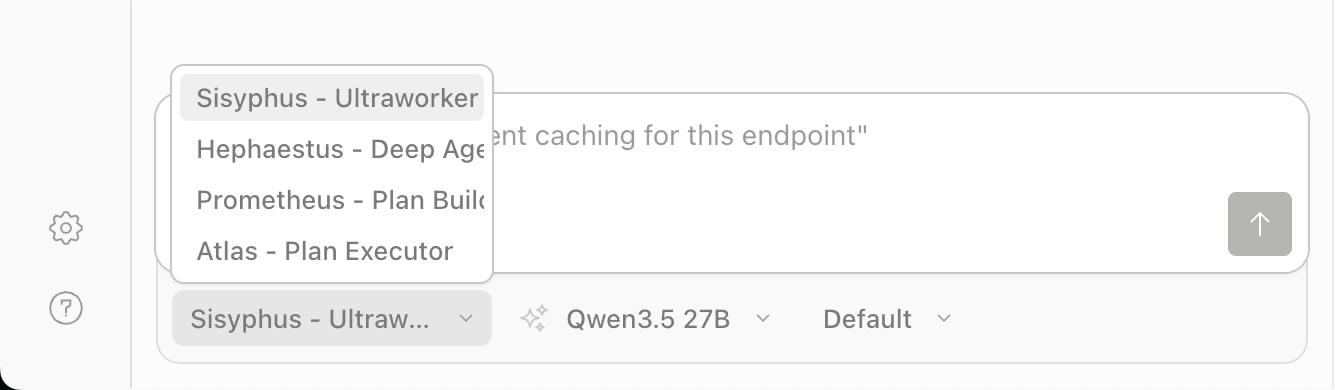
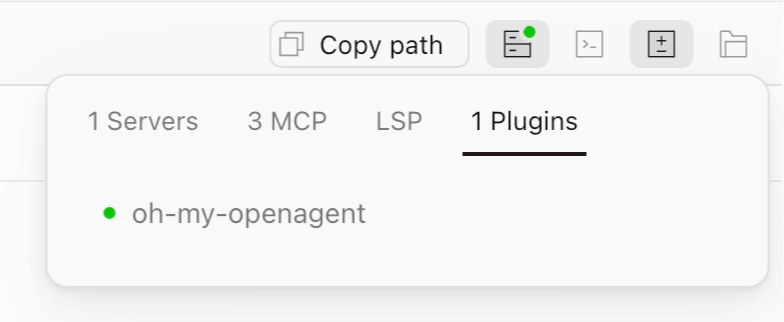
You can also click the status icon in the upper-right corner to confirm that oh-my-openagent appears under plugin.
Use OMO
OMO ships with a set of specialized agents, each with a prompt tuned for a specific role. You choose the main agent from Sisyphus, Prometheus, Atlas, or Hephaestus in the agent selector. The rest are dispatched automatically during multi-agent collaboration.
| Agent | Role | How to access |
|---|---|---|
| Sisyphus | Main orchestrator. Plans, delegates to subagents, and drives parallel execution in ultrawork mode. | Agent selector |
| Hephaestus | Autonomous deep worker. Handles architectural reasoning and long autonomous coding sessions. | Agent selector |
| Prometheus | Strategic planner. Interviews you about requirements and produces a detailed plan. | Agent selector |
| Atlas | Plan executor. Takes over a Prometheus plan and executes it. | Agent selector, or /start-work after planning |
| Oracle | Read-only architecture consultant. Advises on architecture decisions and complex debugging without modifying files. | Auto-dispatched in ultrawork |
| Explore | Code search agent. Retrieves code across the repo. | Auto-dispatched in ultrawork |
| Librarian | Documentation search agent. Searches docs and code. | Auto-dispatched in ultrawork |
Other supporting agents (such as Metis for plan gap analysis, Momus for plan review, and Multimodal Looker for vision input) are dispatched automatically by Sisyphus when needed.
Single-agent mode
With OMO enabled, the agent selector changes from Plan/Build to Sisyphus, Prometheus, Atlas, and Hephaestus. You don't need to start multi-agent collaboration every time. Without the ultrawork keyword, each agent runs on its own and behaves like the original Build or Plan mode, with no extra resource usage.
| Task | How to do it |
|---|---|
| Direct coding (previously Build) | Select Sisyphus and chat normally. Same experience as the original Build mode. |
| Plan first, then execute (previously Plan) | Select Prometheus. It interviews you and produces a plan. Type /start-work to hand off to Atlas. |
| Deep autonomous coding | Select Hephaestus. Suited for large, complex tasks that run autonomously. |
Multi-agent collaboration mode
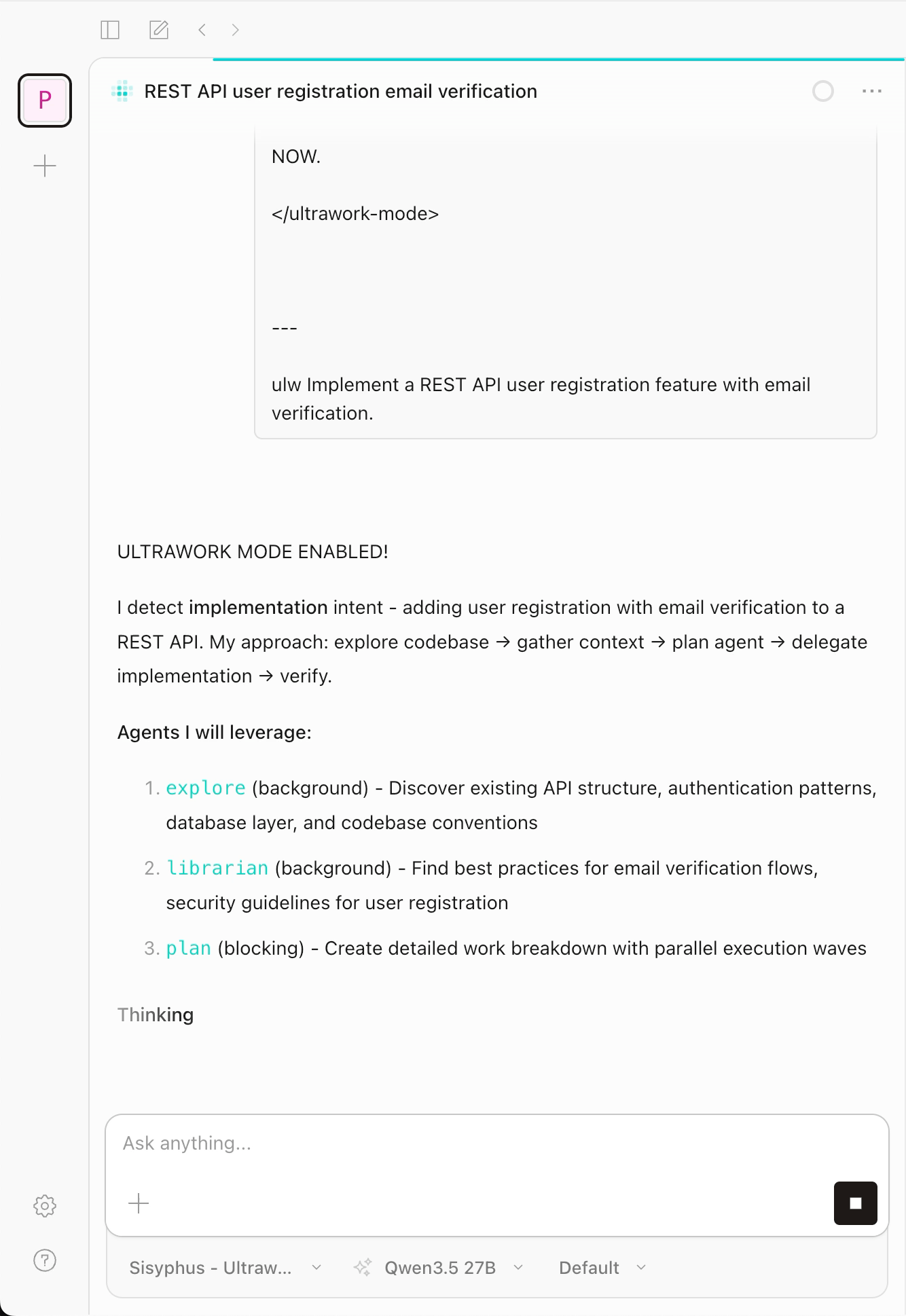
Type ultrawork (or the alias ulw) followed by a task description in the chat box. For example:
ulw Implement a REST API user registration feature with email verification.OMO analyzes the task, assigns it to specialized agents, and runs them in parallel until the task is complete. When ultrawork is active, the colors flashing above the chat box indicate which agent is currently working.
Prometheus planning mode
Unintended skill trigger
Some keywords in your task description might trigger OpenCode to invoke the /web-preview skill. If that happens, ask the agent to ignore it and continue planning.
For large, complex tasks, plan first:
Switch to Prometheus in the agent selector.
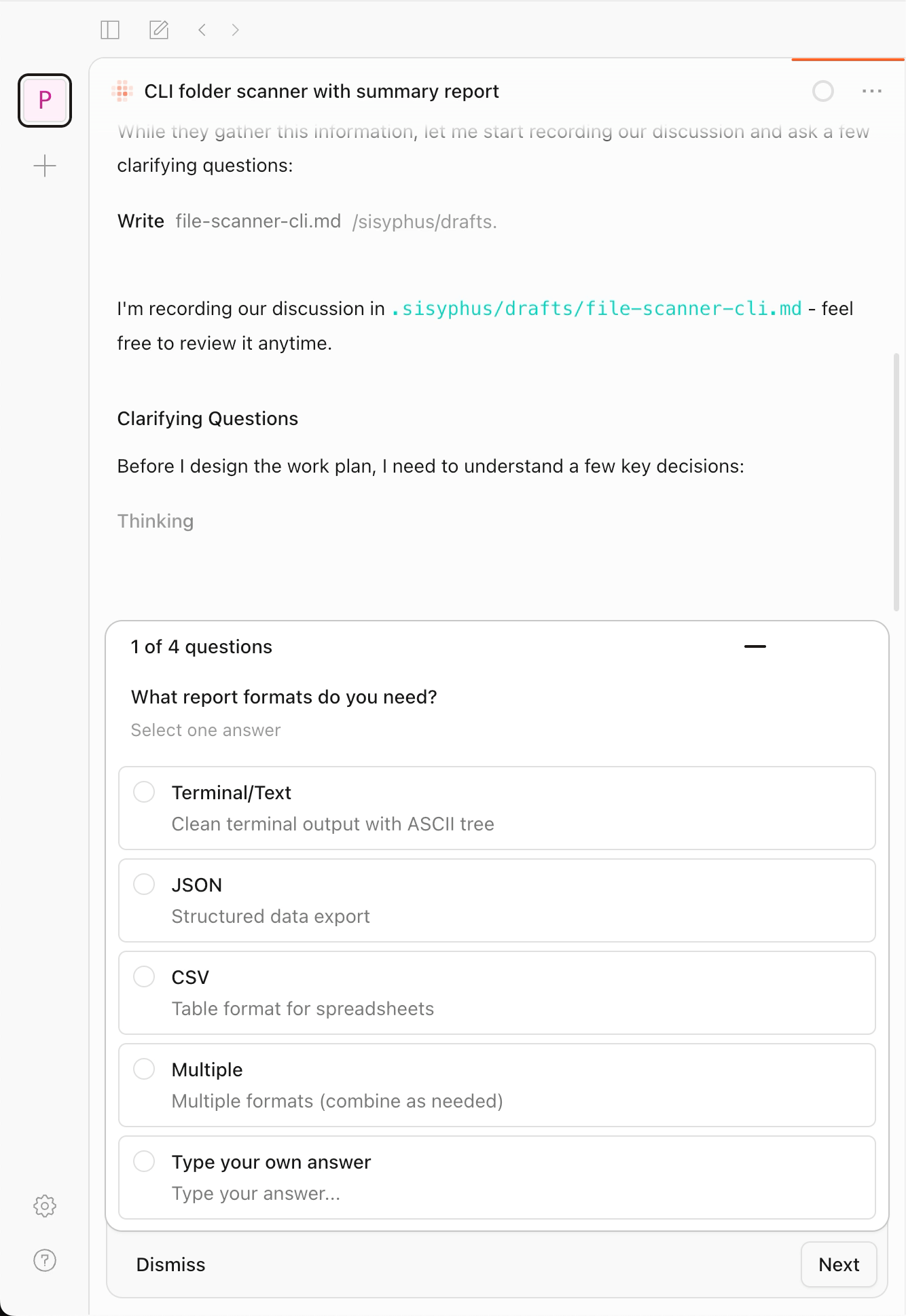
Describe your task. For example:
textBuild a CLI tool that scans a folder and generates a summary report of its contents.Answer Prometheus's questions to clarify scope and details.
After Prometheus generates a plan file under
.sisyphus/plans/, type/start-workto hand execution over to Atlas. If no plan file exists,/start-workhas nothing to pass to Atlas and does nothing.Be patient during planning
If Prometheus doesn't produce output right away, or the agent status shows
background output, the agent is still working. Wait for it to finish before sending another message.
Common commands
| Command | Description |
|---|---|
ultrawork / ulw | Starts multi-agent collaboration mode. Type it as a keyword in the chat box. |
/start-work | Executes the plan produced by Prometheus. |
/init-deep | Generates an AGENTS.md context file for each project directory. |
/ulw-loop | Runs ultrawork in a loop until the task reaches 100% completion. |
/handoff | Produces a context summary so you can continue the work in a new session. |
Use the built-in MCP servers
OMO registers three remote MCP servers that give agents real-time access to external knowledge. These servers aren't native to OpenCode. OMO injects them through a hook. After you enable OMO, you can find them under the MCP tab in Settings.
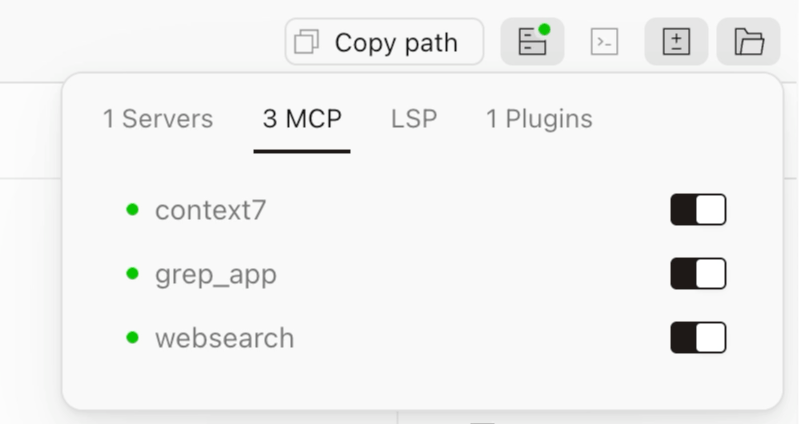
| MCP server | Use case | API key |
|---|---|---|
| context7 | Real-time queries against official documentation. | Not required for basic use. Add a key for a higher quota. |
| grep_app | GitHub-wide code search. | Not required. |
| websearch | Real-time web search. | Not required for basic use. Add a key for higher quotas, or to switch the provider from Exa to Tavily. |
The examples below name the MCP tool explicitly. You can also let the agent pick automatically when it detects the intent.
To raise the quota for context7 or websearch, or to switch the websearch provider from Exa to Tavily, see Configure API keys.
context7: live official documentation
The AI's training data has a cutoff date. When you work with a newer library version, the AI might generate deprecated APIs or non-existent methods. Context7 (provided by Upstash at https://mcp.context7.com/mcp) pulls the latest content directly from the source docs and injects it into the conversation.
For example, enter:
Implement a form submission with React 19's useActionState Hook. use context7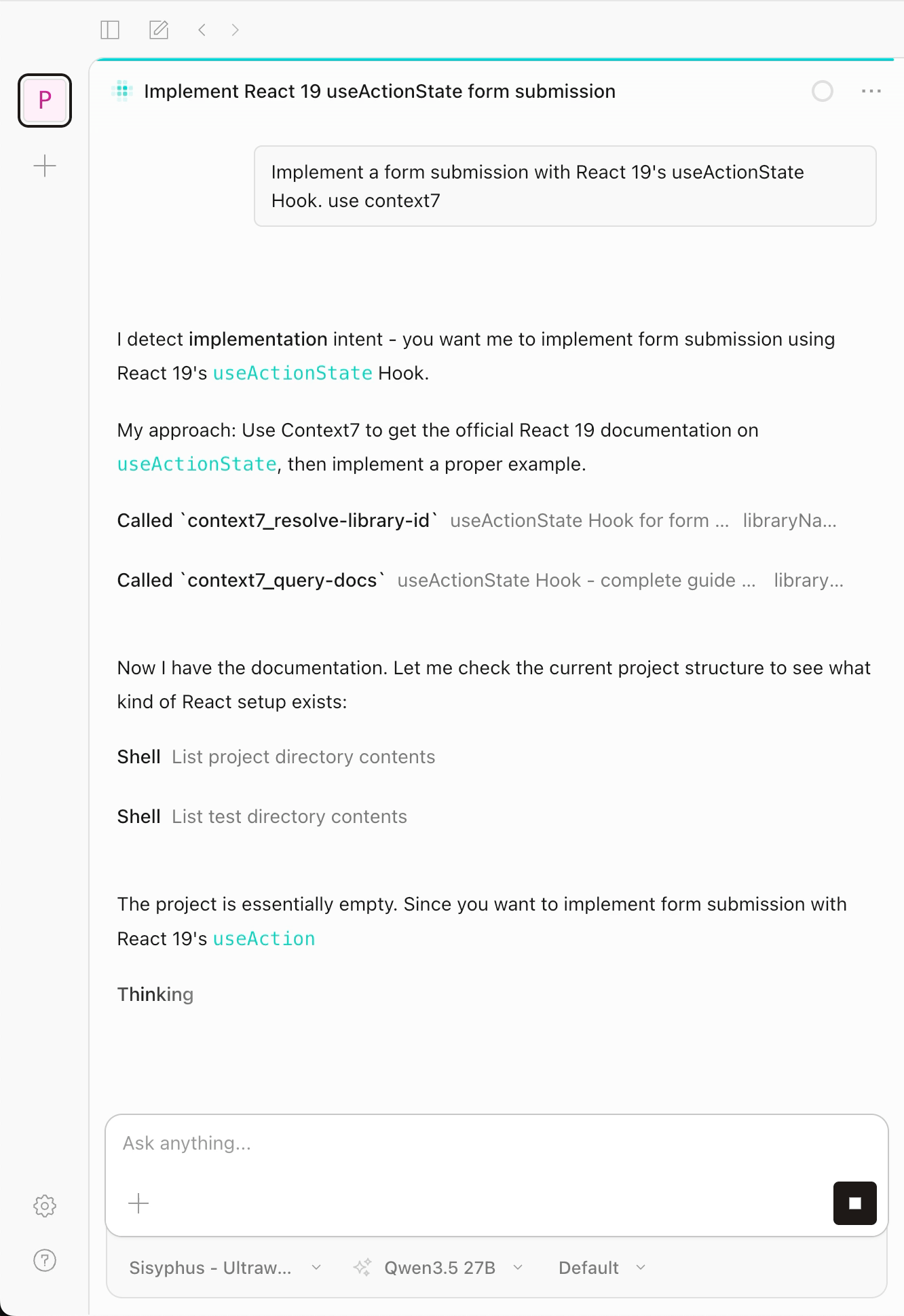
grep_app: GitHub-wide code search
When the AI is unsure about best practices or API usage, it can search real code from GitHub projects for reference. This MCP server is provided by Vercel at https://mcp.grep.app.
For example, enter:
Find real examples of Drizzle ORM with PostgreSQL migrations. use grep_app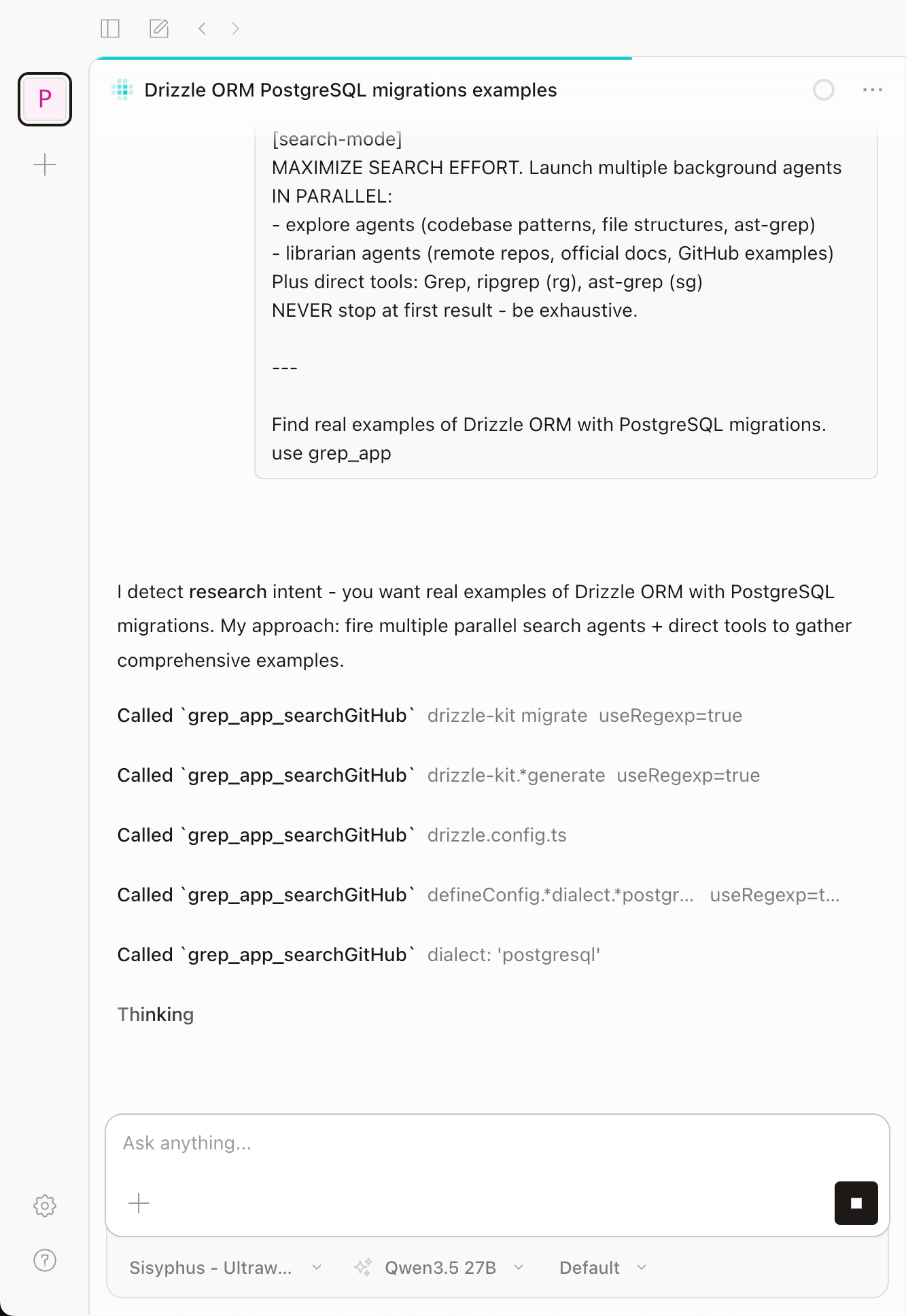
websearch: real-time web search
This MCP server defaults to Exa AI (https://mcp.exa.ai/mcp?tools=web_search_exa) and can be switched to Tavily through configuration.
For example, enter:
What are the major changes in Kubernetes 1.32 released in 2026? use websearch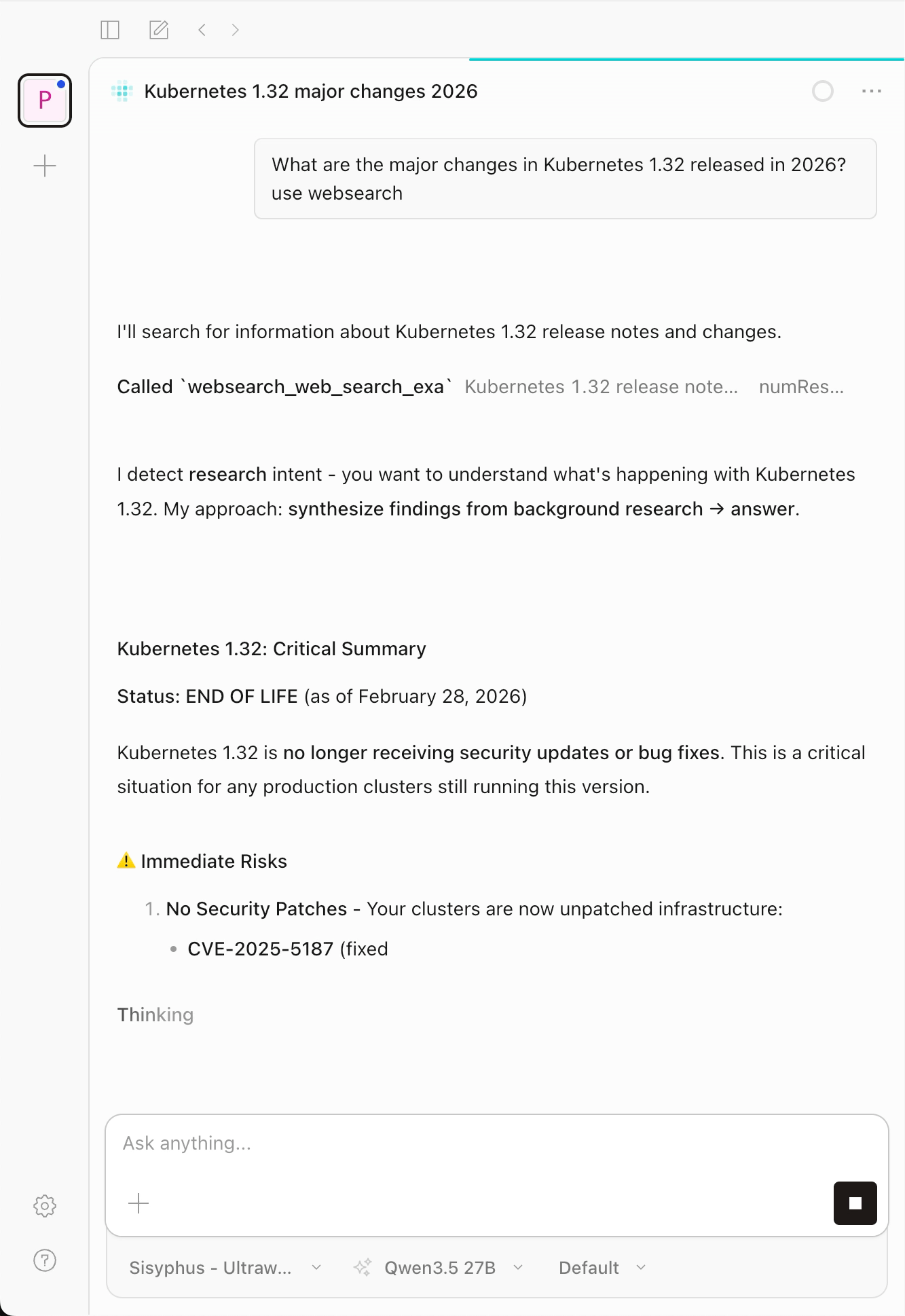
Configure API keys and switch providers
context7 and websearch both work without keys, but adding a key raises your quota and lifts rate limits. You can also switch websearch from Exa (the default) to Tavily. grep_app has no key.
To configure any of this, add an override for the built-in MCP definition under the mcp field in ~/.config/opencode/oh-my-openagent.json. An override replaces the built-in definition entirely, so type, url, and enabled must all be present. If you set more than one override, put them under the same mcp object.
Restart required
Restart OpenCode after every edit to oh-my-openagent.json so the new definition takes effect.
Add an API key for context7
Get a key from context7.com, then add the following to oh-my-openagent.json:
{
  "mcp": {
    "context7": {
      "type": "remote",
      "url": "https://mcp.context7.com/mcp",
      "enabled": true,
      "headers": {
        "CONTEXT7_API_KEY": "YOUR_CONTEXT7_KEY"
      }
    }
  }
}
To verify the key is active, ask the agent to look up a recently released library using use context7, then check your Context7 dashboard for an increase in usage.
Add an API key for websearch (Exa)
By default, websearch uses Exa. Get a key from exa.ai, then add the following to oh-my-openagent.json:
{
  "mcp": {
    "websearch": {
      "type": "remote",
      "url": "https://mcp.exa.ai/mcp?tools=web_search_exa",
      "enabled": true,
      "headers": {
        "x-api-key": "YOUR_EXA_KEY"
      }
    }
  }
}
To verify the key is active, ask the agent to run a web search and check dashboard.exa.ai for an increase in usage after a successful search.
Switch websearch from Exa to Tavily
Tavily is an alternative web-search provider with 1,000 free searches per month. Get a key from app.tavily.com, then point websearch at Tavily:
{
  "mcp": {
    "websearch": {
      "type": "remote",
      "url": "https://mcp.tavily.com/mcp/",
      "enabled": true,
      "headers": {
        "Authorization": "Bearer YOUR_TAVILY_KEY"
      }
    }
  }
}
To verify, run a web search from the agent and check your Tavily dashboard for an increase in usage. To switch back to Exa, replace this block with the Exa definition above.
Disable a specific MCP server
Use a self-hosted Context7 instead
OMO's built-in context7 server queries the public Context7 cloud at https://mcp.context7.com/mcp. To use your own instance, install Context7 on Olares and register it in OpenCode. See Connect Context7 to OpenCode for steps.
Entries in opencode.json take priority over OMO's built-in MCP servers. If you already have a self-hosted Context7 entry in opencode.json, what happens when you enable OMO depends on the entry name:
- If the name is anything other than
context7, both your self-hosted instance and OMO's built-incontext7server load without conflict. - If the name is
context7, it conflicts with OMO's built-in server. Rename your entry inopencode.json(for example, tocontext7-local), or add"disabled_mcps": ["context7"]to~/.config/opencode/oh-my-openagent.jsonto disable OMO's built-in server.
Advanced configuration
Regenerate the oh-my-openagent.json for your subscriptions
The pre-installed configuration enables all providers. If you only subscribe to some of them, ask the agent to regenerate the optimal configuration.
Use the --claude, --openai, --gemini, and --copilot flags (set each to yes or no) to match your actual subscriptions. For example, if you subscribe to Claude and Copilot but not OpenAI or Gemini, enter the following in the chat window:
Run: npx oh-my-opencode install --no-tui --claude=yes --openai=no --gemini=no --copilot=yesAdjust yes/no based on which providers you actually have. This updates ~/.config/opencode/oh-my-openagent.json.
Version requirement
This command requires OpenCode version 1.4.0 or later. It rewrites the configuration for all agents, but only the subagent models take effect from the file. The main agent always uses the model you select in the OpenCode UI.
Override an agent's model manually
To set a specific model for an agent, edit ~/.config/opencode/oh-my-openagent.json and update the model field:
{
  "agents": {
    "sisyphus": { "model": "kimi-for-coding/k2p5" },
    "oracle": { "model": "openai/gpt-5.4", "variant": "high" }
  }
}
WARNING
Explore and Librarian are tool-use agents. Assigning high-capability models to them raises token usage without improving results.
FAQ
ultrawork doesn't respond or throws an error
Ask OpenCode to run the diagnostic:
Run: npx oh-my-opencode doctorUsually this means no provider has been authenticated.
How do settings in oh-my-openagent.json relate to the model picked in the UI?
The UI selection controls the main agent (the one you chat with). oh-my-openagent.json controls subagents, which are background tasks dispatched by the main agent through delegate_task. The two are independent.
Can I use multiple providers at the same time?
Yes, and it's recommended. The more providers you configure, the more models are available in the UI selector, and the more fallback options are available for subagent delegation. You still need to pick a model for the main agent manually.
use context7, use grep_app, or use websearch doesn't work
Confirm OMO is enabled. The MCP tab in Settings should show a green dot next to each server. If a server is gray or disconnected, the remote endpoint might be temporarily unavailable. Try again later.
Plugin installation fails on first launch
Check the Pod logs for the init-packages container and search for oh-my-opencode. If npm downloads time out, confirm your Olares can reach the internet.
Will my authentication data persist after a restart?
Yes. Authentication is stored under ~/.config/opencode/ and reloaded automatically after a restart.
Will an Olares upgrade overwrite my configuration?
No. oh-my-openagent.json is only written when the file doesn't exist. The global opencode.json only manages the Olares-owned plugin and instructions entries. Any other entries you added are preserved. Skill files (web-preview, system-admin) are force-updated to the latest version on every startup.
Will I know when a model switches automatically?
Yes. When runtime_fallback switches to another model, a toast notification appears showing which model is now in use.
Learn more
- Set up OpenCode as your AI coding agent: Install OpenCode and connect it to Ollama.
- Extend OpenCode with skills and plugins: Add capabilities through skills and plugins.
- Connect AI coding assistants to up-to-date docs with Context7: Register Context7 as a remote MCP server in OpenCode.
- OMO overview: Official introduction to OMO's architecture and agents.
- Agent-to-model matching reference: Recommended models for each agent and task category.